





Introduction
Web hosting is one of the most important factors affecting a website's speed and overall performance. It serves as the infrastructure that allows a website to operate and deliver its services to users. Regardless of how well a website is coded, how effectively its files are optimized, or how well it is designed, its performance may still fall short if the hosting environment is weak or lacks the appropriate resources and technologies.
A website is essentially a collection of files and data that requires a secure and stable digital home where they can be stored and delivered to visitors around the clock. When hosting servers are fast and powerful, they can help web pages load quickly, which is crucial not only for providing a better user experience and reducing bounce rates, but also because website speed is an important factor considered by search engines such as Google. Faster websites can therefore contribute to better search rankings and help businesses reach a wider audience.
In addition, web hosting plays a critical role in website security and protection against cyberattacks and hacking attempts. Reliable hosting providers typically offer advanced security measures such as firewalls, SSL certificates, and regular backups. These features help protect website data and make it possible to restore the website if something goes wrong or an unexpected incident occurs.
The role of web hosting is not limited to security. It also directly affects website stability by providing reliable servers and high uptime. This reduces the likelihood of website downtime and helps ensure that services remain available to users. As a result, reliable hosting can strengthen visitors' and customers' trust in a website and its brand while improving the overall user experience and increasing the chances of digital business success.
For these reasons, investing in reliable, high-quality web hosting is more than just a technical decision. It is a strategic investment that can help protect a website, strengthen its reputation, improve the user experience, and support long-term growth and stability in an increasingly competitive digital environment.
With thousands of companies offering web hosting services, choosing the right hosting for a WordPress website can be confusing, especially when providers differ in terms of features, pricing, performance, and available resources.
In this guide, we will explore the most important factors to consider when choosing WordPress hosting and explain how each factor can affect your hosting performance. Before discussing these criteria, however, it is important to understand what web hosting is, how it works, and the main types of hosting available. This will give you a clear understanding of hosting and help you evaluate different options and choose the service that best fits your website's needs.
What Is Web Hosting?
Web hosting is a service that provides space on an internet-connected server to store a website's files and resources, allowing the website to operate and be accessed from anywhere at any time. Hosting resources typically include storage space, server memory, processing power, and network bandwidth. These resources are essential for ensuring that a website operates efficiently and reliably.
To understand web hosting more easily, you can think of it as renting a piece of land in the real world. If you want to build a house or open a store, you first need a place where the project can be established. You then place your belongings or products there so that other people can access and use them.
The same principle applies to the digital world. A website or application needs a place where its files can be stored so that users can access it over the internet.
This digital space is provided by a high-performance computer that operates continuously, 24 hours a day, and is known as a server. The server stores the website's files and delivers them to visitors when they request them.
The company that provides, manages, and maintains these servers and helps ensure their continuous operation is known as a hosting provider.
Therefore, web hosting is a fundamental component of any website or web application. It provides the environment and resources required to store files and operate a website efficiently, ensuring that it remains accessible, stable, and easy for users to reach.
Now that we understand what web hosting is and how it works, let's explore the different types of web hosting, their characteristics, and their advantages. Understanding these options will help you determine which type of hosting is most suitable for your website.
What Are the Different Types of Web Hosting?
1. Shared Hosting
Shared hosting is one of the most common types of web hosting. It involves hosting multiple websites on a single physical server, with all websites sharing the server's core resources, including CPU, RAM, storage, and bandwidth.
You can think of shared hosting as living in a shared house. Each person has their own room and private space, but everyone shares the house's common facilities and resources.
Does shared hosting require technical experience?
Shared hosting does not require advanced technical knowledge. It is one of the easiest types of hosting to manage because hosting providers typically offer user-friendly control panels that simplify website, file, and database management.
For this reason, shared hosting is particularly suitable for beginners and owners of small websites.
2. VPS Hosting
Virtual Private Server (VPS) hosting is a type of hosting that combines some of the advantages of shared and dedicated hosting. In this setup, a physical server is divided into multiple independent virtual servers, with each website or customer receiving a dedicated portion of the server's resources, such as CPU, RAM, and storage.
VPS hosting can be compared to a large residential building divided into separate apartments. Each apartment has its own private space and privacy, while some of the building's underlying infrastructure is shared with other apartments.
If shared hosting is like having a room in a shared apartment, VPS hosting is more like having your own apartment in a residential building.
You still share the physical building with other residents, but your resources and environment are more isolated. Other users are less likely to directly affect your website's performance through excessive resource consumption.
Hosting providers create a virtual isolation layer between VPS environments, similar to the walls separating individual apartments. This gives each VPS greater independence, flexibility, and control over server settings and resources compared with shared hosting.
Does VPS hosting require technical experience?
VPS hosting generally requires an intermediate level of technical knowledge compared with shared hosting because it gives users greater control over server configurations.
Users may need basic knowledge of operating system management, software installation, security configuration, and server performance monitoring to ensure that the server remains stable and efficient.
3. Dedicated Hosting
Dedicated hosting is a type of hosting in which an entire physical server is assigned to a single website or application. The customer does not share the server's resources with other websites.
If shared hosting is like having a room in an apartment, and VPS hosting is like having your own apartment in a building, dedicated hosting is like having an entire house to yourself. You have access to all of its resources without sharing them with other users.
With dedicated hosting, the hosting provider supplies an entire server and its hardware resources, including the CPU, RAM, and storage, exclusively for your website or application.
This provides a high level of performance because all server resources are available to your website rather than being shared with other sites that could potentially consume excessive resources and affect performance.
Dedicated hosting also provides extensive control over server configurations, including the choice of operating system, software installation, and resource allocation based on the website's requirements.
For this reason, dedicated hosting can be suitable for large websites, high-traffic online stores, and platforms that require powerful performance, high reliability, and advanced security.
Does dedicated hosting require technical experience?
Yes. Dedicated hosting generally requires advanced technical knowledge because it gives users extensive control over the server and its configuration.
Managing a dedicated server may require knowledge of operating systems, security configuration, software installation, server monitoring, updates, and regular maintenance.
4. Cloud Hosting
Cloud hosting is a type of web hosting that relies on a network of interconnected servers rather than a single physical server.
This means that your website does not depend on one machine alone. Instead, its resources and data can be distributed across multiple servers that work together as a unified hosting environment, providing greater flexibility and scalability.
Cloud hosting differs from traditional hosting in how it handles server failures and changes in demand.
With traditional hosting, if the server hosting your website experiences a failure or goes offline, the website may become unavailable until the issue is resolved.
With cloud hosting, if one server experiences a failure or is taken offline for maintenance, the workload can be redirected to other servers within the network. This reduces the risk of downtime and helps maintain service availability.
Who is cloud hosting suitable for?
Cloud hosting is suitable for websites that require high flexibility and the ability to handle changing levels of traffic. Examples include online stores, news websites, educational platforms, and applications experiencing continuous growth.
It is also suitable for projects that require reliable performance and stability, particularly during periods of increased demand or sudden traffic spikes.
Does cloud hosting require technical experience?
The level of technical knowledge required depends on the type of cloud hosting service you choose.
Some cloud hosting plans are fully managed by the hosting provider, making them easy to manage without advanced technical expertise. More advanced cloud hosting solutions, however, may require technical knowledge to manage server configurations, monitor resource usage, and optimize security and performance settings.
5. WordPress Hosting
WordPress hosting is a type of web hosting specifically designed and optimized for running WordPress websites.
It provides a hosting environment that is pre-configured to work with WordPress, using settings, tools, and technologies designed to improve website speed, enhance security, and simplify website management.
The main difference between WordPress hosting and standard web hosting lies in the level of optimization and customization provided.
Traditional web hosting provides server space that can be used to build and run different types of websites, whether they are powered by WordPress, another content management system, or custom-built applications.
WordPress hosting, on the other hand, is specifically optimized for WordPress requirements. It may include advanced technical configurations designed to improve speed, security, and compatibility with WordPress themes and plugins.
Instead of requiring website owners to manually install WordPress and configure complex server settings, many WordPress hosting providers offer one-click WordPress installation, automatic updates, automated backups, and other management tools.
These features reduce the amount of technical work required and allow website owners to focus more on creating content or managing their businesses.
To put it simply, you can think of WordPress as a powerful car engine, while WordPress hosting represents the environment designed to help that engine operate efficiently.
Just as an engine requires the right components to perform at its best, WordPress benefits from a hosting environment specifically configured for its requirements. This can help provide better speed, stability, security, and overall user experience.
Who is WordPress hosting suitable for?
WordPress hosting is suitable for websites that use WordPress, including blogs, business websites, and online stores powered by WordPress plugins.
It is particularly suitable for users who want an easier way to manage their websites and benefit from optimized performance without having to manually configure server settings.
Does WordPress hosting require technical experience?
WordPress hosting generally does not require advanced technical knowledge because it is designed to simplify WordPress website management.
Hosting providers offering WordPress hosting often provide tools and pre-configured settings that make it easier to install WordPress, manage updates, create backups, and maintain the website.
For this reason, WordPress hosting is a suitable option for beginners and website owners who have limited experience managing servers.
Now that we have explored the different types of web hosting, let's move on to the most important factors to consider when choosing the right WordPress hosting service.
How to Choose the Right WordPress Hosting?
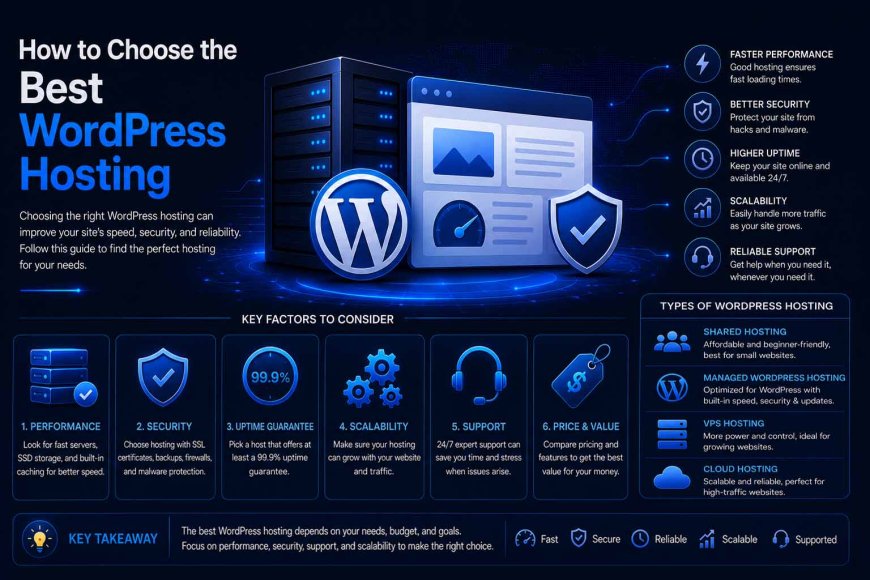
When choosing WordPress hosting, there are several important factors you should consider to ensure that the hosting service meets your website's needs. The most important criteria include:
-
WordPress Compatibility: Make sure that the hosting provider offers an environment that is fully compatible with WordPress requirements. This helps ensure that your website, themes, and plugins operate correctly and reliably.
-
Performance and Speed: Hosting performance directly affects page loading times, user experience, and search engine performance. Choose a hosting provider that offers sufficient resources for your website, including adequate RAM, CPU cores, processing power, and storage. It is also preferable to choose hosting that uses fast storage technologies such as SSD or NVMe and provides performance optimization features such as caching, file compression, and optimized server configurations.
-
Easy Setup and Management: Choose a hosting service that makes WordPress installation and management simple. One-click WordPress installation can save time and effort compared with manual installation, which may require uploading files, creating databases, and configuring the WordPress installation. Useful management features such as automatic updates and easy file and database management are also important, especially for users without advanced technical knowledge.
-
Backups: Regular backups are essential when choosing WordPress hosting. Ideally, the hosting provider should offer automatic daily backups so that you can quickly restore your website if something goes wrong, such as installing an incompatible plugin or making incorrect changes to your website files.
-
Security: Choose a hosting provider that offers strong security features to protect your website from hacking attempts and cyberattacks. Important features may include malware scanning and removal, firewalls, DDoS protection, free SSL certificates, and continuous security monitoring.
-
Scalability: Your hosting should be able to grow with your website. As traffic increases, your database expands, and you add new products or services, your website may require additional resources. Choose a provider that allows you to easily upgrade storage, RAM, processing power, or other resources without requiring a complicated server migration.
-
Customer Support: Reliable customer support can make a significant difference when technical problems occur. Choose a hosting provider that offers fast and effective support, preferably from a team with experience handling WordPress-related issues. This can help resolve problems more efficiently and minimize potential downtime.
-
Uptime Guarantee: Uptime refers to the percentage of time your website remains available and operational. Choose a hosting provider that offers a high uptime guarantee, as frequent downtime can negatively affect the visitor experience, customer trust, and potentially your website's performance in search engines.
-
Pricing and Value: Price is an important consideration, but it should not be the only deciding factor. Compare the cost of each hosting plan with the resources, features, and level of service it provides. Also, check the renewal price and any additional fees before signing up.
What to Keep in Mind
Choosing the right WordPress hosting requires looking beyond the price or hosting type. Factors such as performance, security, customer support, scalability, backups, and WordPress compatibility all play an important role in determining whether a hosting service is suitable for your website.
Once you understand these factors, the next step is to avoid the common mistakes that can lead to poor hosting decisions and unnecessary costs.
Common Mistakes to Avoid When Choosing WordPress Hosting
Mistakes are common when choosing WordPress hosting, often because users focus on certain factors while overlooking other important considerations. Here are some of the most common mistakes to avoid:
-
Choosing Hosting Based Only on Price: Some low-cost hosting plans may appear attractive at first, but they may come with limited resources, poor performance, or inadequate customer support. Instead of simply choosing the cheapest option, compare the price with the resources, features, and level of service included in the plan.
-
Ignoring Server Location: Server location can affect website loading speed. The closer the server is to your primary audience, the lower the potential network latency and the better the visitor experience can be. Therefore, choose a hosting provider with servers located near the geographic region where most of your visitors are based.
-
Paying Extra for Unnecessary Features: Some hosting providers offer numerous additional features and services, but not every feature is necessary for every website. Choose a plan based on your website's actual requirements and avoid paying extra for resources or tools that you are unlikely to use.
-
Failing to Consider Future Growth: Some hosting plans may be suitable for new websites but become insufficient as traffic and content increase. Make sure that your hosting provider offers an easy way to upgrade resources when your website needs more storage, memory, processing power, or other resources.
-
Ignoring Customer Support Quality: Technical issues can occur at any time while operating a website. Having access to fast and knowledgeable customer support can therefore make a significant difference. It is preferable to choose a hosting company with experience handling WordPress-related issues so that technical problems can be resolved efficiently when they occur.
-
Failing to Check Renewal Terms: Some hosting companies offer heavily discounted introductory prices and then charge significantly more when the plan renews. Always check the renewal price, billing terms, and any additional fees before making a final decision.
In short: Choosing the right WordPress hosting is not about finding the cheapest hosting plan. It is about finding a service that offers the right balance of performance, security, support, and resources for your website's current and future needs.
Conclusion
WordPress hosting is one of the key factors that can influence a website's success. Its role extends far beyond simply providing storage space for website files. A reliable hosting service can have a significant impact on website speed, stability, security, and the overall user experience.
Choosing the right hosting service from the beginning can help you build a fast, secure, and reliable website while providing a solid foundation for future growth and development.
For this reason, it is important to carefully evaluate your hosting options rather than choosing a provider based solely on price. The best approach is to choose a WordPress hosting service that offers the right balance of performance, security, reliability, support, and scalability to meet your website's current and future needs.