





Introduction
WordPress is one of the most powerful and popular platforms for creating websites. However, simply having a WordPress website does not guarantee that it will rank among the top results in search engines. To reach a larger audience and build a strong online presence, your website needs continuous optimization based on clear Search Engine Optimization (SEO) principles.
Website optimization involves a range of techniques and practices that help search engines better understand and index your content, while also improving website speed, content quality, user experience, and other factors that can affect your visibility and rankings in search results.
To learn more about these techniques, continue reading this article, where we will explain how to optimize a WordPress website for search engines (SEO), starting with the basic steps for setting up the website and improving its structure, and moving on to advanced techniques that can help improve your page rankings and increase your chances of appearing in search results. But before we begin, let us first understand what Search Engine Optimization (SEO) means, why it is important for websites, and the main aspects and factors that influence it. This will help us better understand these techniques and apply them more effectively.
What Is SEO?
SEO stands for Search Engine Optimization. It refers to a set of techniques and practices aimed at improving the visibility of a website and its pages in search engine results, such as Google, and increasing the chances of users finding the website organically when searching for keywords or phrases related to its content.
Simply put, SEO aims to make your website easier for search engines to understand, allowing them to identify its content and match it with relevant search queries. The more closely a website aligns with search engine guidelines and user needs, the greater its chances of appearing in search results and reaching an audience interested in the content, services, or products it offers. This helps attract organic traffic to the website.
Search Engine Optimization covers several key areas, including:
-
Content Optimization: Providing useful and trustworthy content that meets the searcher's needs and gives them the information they are looking for. For example, when writing an article about a specific product, the article should include important information about the product, such as its specifications, features, drawbacks, and uses. This information should be presented clearly and concisely without unnecessary filler or repetition. The more useful the content is and the more genuine value it provides to readers, the more likely users are to benefit from it and the better its chances of performing well in search engines. This is different from content that provides little useful information or simply repeats the same points without adding value.
-
Keywords: Using the words and phrases that users search for naturally within your content so that search engines can understand the topic of the page and match it with relevant search queries. For example, if a user is looking for a laptop for studying, they might search Google for phrases such as “best laptop for studying,” “best laptop for students,” or “affordable laptop for studying.” These phrases can be used as keywords when creating content aimed at people searching for this information. However, avoid excessive keyword repetition or inserting keywords unnaturally into the content.
-
Technical Optimization: Improving the technical aspects of a website that help search engines access its pages, understand its content, and index it correctly. This includes improving website loading speed, organizing its structure, ensuring that important pages can be crawled and indexed, and resolving technical issues that may affect the website's visibility in search results. For example, if website pages are extremely slow or technical issues prevent search engines from accessing them, this may negatively affect the website's performance.
-
Links: Optimizing internal links within the website and obtaining external links from trustworthy and relevant websites. Internal links help users navigate between related pages and also help search engines discover website pages and understand its structure. External links pointing to your website from other websites can help strengthen its credibility, especially when they come from high-quality, reputable websites that are relevant to the content you provide.
-
On-Page Optimization: Improving the elements within website pages, such as page titles, meta descriptions, headings, links, images, text, and other important elements. For example, the page title should be clear and accurately describe its content, while the meta description should be relevant and give users a clear idea of what they will find on the page. Content should also be organized using clear headings, images should be optimized in terms of size, file names, and alternative text (Alt Text), and links within the page should be clear and relevant to the content. These improvements make the page more organized and easier for users to read and understand, while also helping search engines better understand the page's content and elements.
Therefore, Search Engine Optimization (SEO) is not limited to simply adding keywords to articles. It is a comprehensive process that includes content, technical aspects, website structure, links, and other elements. The goal is to provide a useful and user-friendly website for visitors while also making it clear and understandable to search engines, allowing them to understand its content, discover and index its pages, and display them to the right users in search results.
Why Is SEO Important?
Search Engine Optimization (SEO) is one of the most important factors that can contribute to the success of a website. It is not limited to improving the ranking of website pages in search results; it also helps reach the right audience, improve user experience, and achieve the website’s goals.
Its importance can be seen in several key areas:
-
Increase Website Visibility: SEO improves the chances of your website pages appearing in search results when users search for keywords and phrases related to your industry.
-
Attract Targeted Traffic: When your website appears in front of people who are actively searching for the information, products, or services you provide, the traffic you receive is more relevant to your target audience.
-
Build Trust and Credibility: Strong visibility in search results, combined with useful content and a trustworthy user experience, can help increase users’ trust in your website and brand.
-
Achieve Long-Term Results: Investing in SEO can help build a consistent presence in search results rather than relying entirely on paid advertising to attract visitors.
-
Support Website Goals: Reaching the right audience and improving the user experience can help your website achieve its goals, whether that means increasing sales, generating leads, increasing subscriptions, or encouraging engagement with your content.
What Factors Affect SEO?
Search Engine Optimization (SEO) does not depend on a single factor. Instead, it is influenced by a range of aspects that work together to determine how easily search engines can understand, crawl, index, and rank your website. These aspects can generally be divided into several main areas:
-
Content Quality: Content should be useful, original, clear, and provide a comprehensive answer to the user’s needs or questions.
-
Keywords: Choosing the right keywords and phrases and using them naturally in titles, content, and other important page elements.
-
On-Page SEO: This includes optimizing page titles, meta descriptions, headings, internal links, content structure, and images.
-
Technical SEO: This focuses on the technical aspects that help search engines access, understand, and index a website, such as website speed, mobile-friendliness, XML sitemaps, and the
robots.txtfile. -
User Experience: This includes how easy the website is to use and navigate, its loading speed, content clarity, and how well it adapts to different devices.
-
Backlinks: Links that point to your website pages from other websites, particularly when they come from trustworthy and relevant websites within your industry.
-
Website Structure: Organizing pages, categories, and links in a clear way that helps both users and search engines understand the relationships between different parts of the website and easily access important pages.
-
Crawling and Indexing: Search engines must be able to access, crawl, and properly index your important pages so that they are eligible to appear in search results.
-
Reputation and Trustworthiness: The quality and credibility of the website and its ability to provide reliable and useful information, particularly in areas that require a higher level of accuracy and expertise.
Therefore, improving SEO requires looking at the website as a whole rather than focusing only on keywords or content. This makes SEO an ongoing process that combines content, technical aspects, user experience, website structure, links, and trustworthiness.
Now that we have covered what Search Engine Optimization (SEO) is, why it is important for websites, and the main aspects and factors that affect website performance and visibility in search results, we can move on to the practical part: how to optimize your website for search engines.
How to Optimize WordPress for Search Engines?
First: Prepare Your WordPress Website for Search Engines
Before creating content and building links, it is important to make sure that your WordPress website is properly configured and allows search engines to access and index its pages. Although this step may seem simple, it is one of the basic settings that should be checked, because enabling the option that prevents search engines from indexing the website can make your pages ineligible to appear in search results.
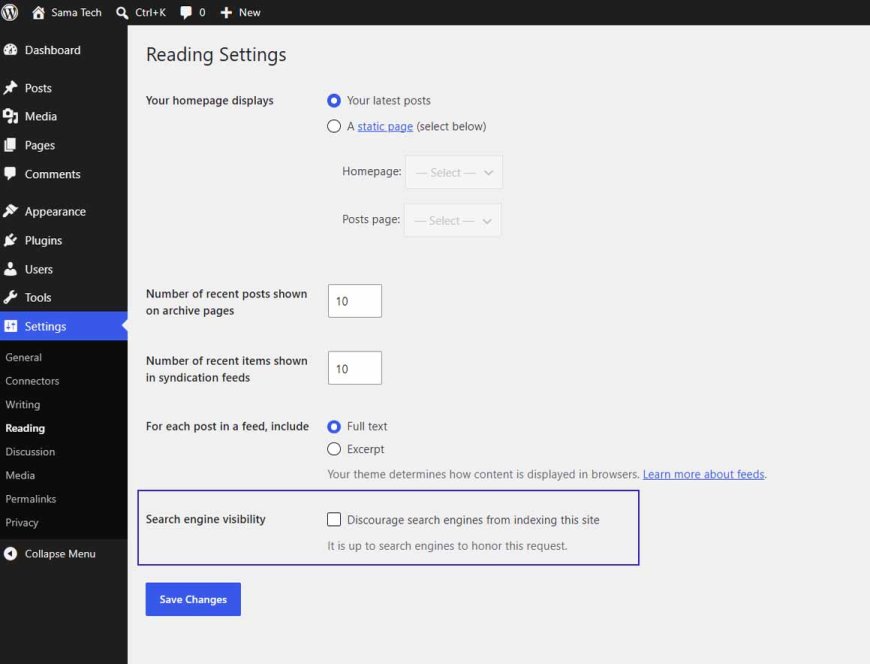
WordPress provides a dedicated setting that prevents search engines from indexing the website. This option can be useful temporarily while developing or preparing a website before launching it. However, if this option remains enabled after the website goes live, it may prevent search engines such as Google from indexing your pages, meaning they will not be able to appear naturally in search results.
To make sure your website is accessible to search engines, log in to your WordPress dashboard, then go to Settings > Reading. Next, scroll down to the Search engine visibility section. Make sure the “Discourage search engines from indexing this site” option is not enabled. If it is enabled, uncheck it and then click “Save Changes.”
This step is important because enabling this option may prevent search engines from crawling and indexing your website and its pages, preventing them from appearing in search results regardless of the quality of the published content.
2. Use SEO-Friendly URLs
URLs are an important part of a website’s structure, and it is best for them to be clear and understandable to both users and search engines. Therefore, it is recommended to use descriptive URLs that accurately reflect the content of the page. They can also include the primary keyword or a phrase related to the topic in a natural way.
For example, if you have an article about optimizing WordPress for search engines, it is better to use a clear URL such as:
https://yourdomain.com/wordpress-seo/
instead of using an unclear URL such as:
https://yourdomain.com/?p=123
The first URL gives both the user and search engine a clear idea of what the page is about, while the second provides no information about its content.
To set up SEO-friendly URLs, log in to your WordPress dashboard, then go to Settings > Permalinks. Next, select “Post name” under the permalink structure settings, and then click “Save Changes” to apply the settings.
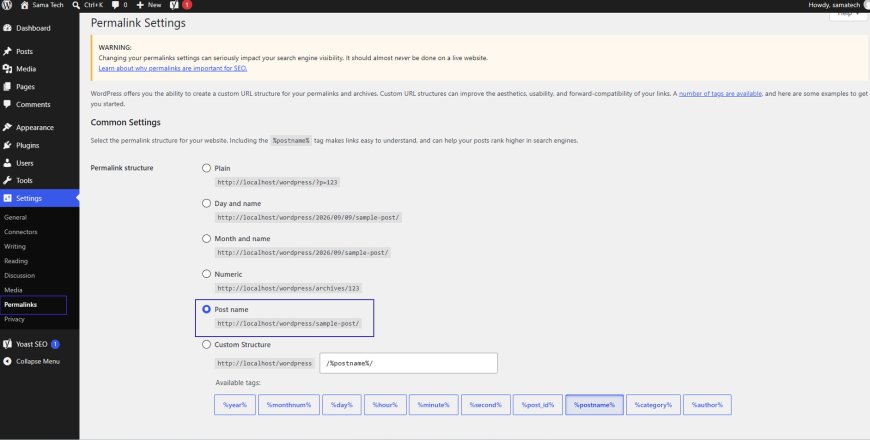
It is recommended to configure this setting at the beginning of your WordPress website setup, before publishing a large number of pages and posts. Changing the permalink structure later can change your existing URLs, which may require setting up appropriate redirects to preserve the old URLs and avoid broken links or missing pages.
By following this approach, your website URLs will become clearer, easier to read, and easier to remember. They will also provide a clear structure that helps both users and search engines better understand your page content and navigate your website.
3. Choose an SEO Plugin
A good SEO plugin can make the process of optimizing a WordPress website for search engines much easier, especially for users who do not have technical or programming experience. These plugins provide a range of tools that help you optimize important elements within your website pages, such as page titles and meta descriptions. They can also generate an XML sitemap and manage certain technical settings without requiring you to write code or manually edit website files.
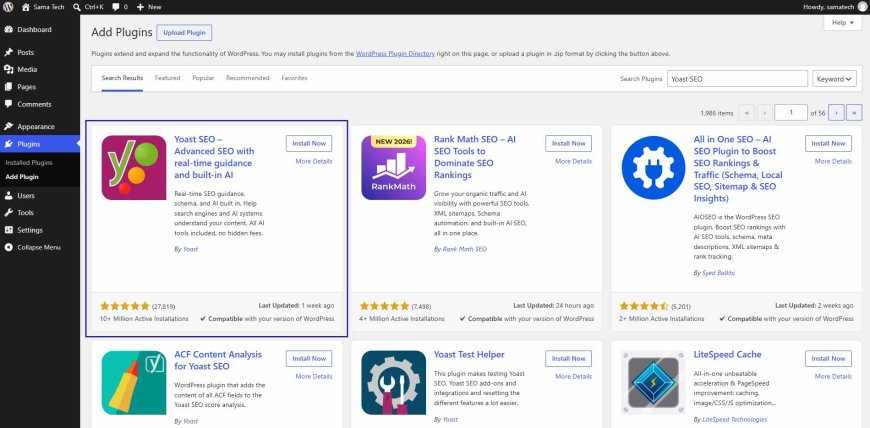
There are many SEO plugins available for WordPress, and Yoast SEO is one of the most popular. It provides a range of specialized tools that help optimize your website and its content for search engines. The free version includes many essential features, such as optimizing page titles and meta descriptions, analyzing content and readability, and generating an XML sitemap. A paid version called Yoast SEO Premium is also available, offering additional features for improving content and managing SEO more extensively.
Why Do You Need an SEO Plugin?
-
Content Optimization: The plugin helps analyze the content of pages and posts, including keyword usage, content length, headings, readability, and various on-page SEO factors. It also provides suggestions to help you identify areas that could be improved.
-
Technical SEO Assistance: SEO plugins provide tools that help with certain technical tasks, such as generating an XML sitemap, controlling some indexing settings, managing the
robots.txtfile, and adding structured data (Schema), depending on the plugin and the available settings. -
Improve Content Appearance When Shared: These plugins allow you to control some of the information displayed when your website pages are shared on social media platforms, such as the page title, description, and featured image. This helps present your content more effectively when it is shared.
-
Easy SEO Settings Management: Instead of searching for different settings and modifying them manually, SEO plugins bring many SEO tools together in one place, making website optimization and management easier, especially for beginners.
-
Integration with Page Builders: If you use page builders such as Elementor, many SEO plugins work well with them, allowing you to optimize the SEO settings of your pages while editing them without having to leave the website editor.
Note: Installing an SEO plugin does not mean that your website is automatically optimized for search engines. The plugin provides tools and features to make optimization easier, but the results depend on how you use these tools, along with content quality, technical performance, user experience, and other SEO factors.
4. Set Up an XML Sitemap
An XML sitemap is a file that contains the URLs of important pages on your website. It helps search engines discover website pages, understand its structure, and crawl them more efficiently. It can be thought of as a guide that shows search engines which pages are available on your website. Since a sitemap is an important element that helps search engines discover website content, it is essential to make sure that it is properly available and configured.
In the previous step, we installed and activated the Yoast SEO plugin, which automatically generates an XML sitemap for you. Therefore, you do not need to create or configure it manually. All you need to do is access it directly by adding /sitemap_index.xml to your website URL, for example:
https://example.com/sitemap_index.xml
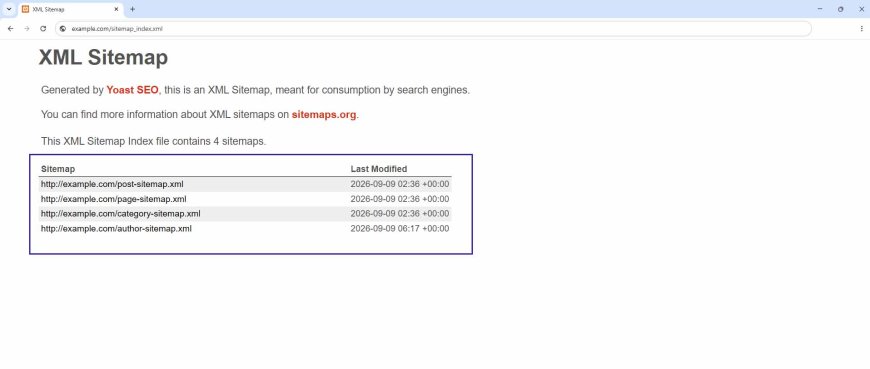
After confirming that the sitemap is working correctly, you can submit it to Google Search Console to help Google discover the URLs on your website.
To submit your sitemap, open Google Search Console and go to the “Sitemaps” section. Then enter your sitemap URL, such as sitemap_index.xml, and click “Submit.” You can then monitor the sitemap status and make sure that Google has successfully processed it.
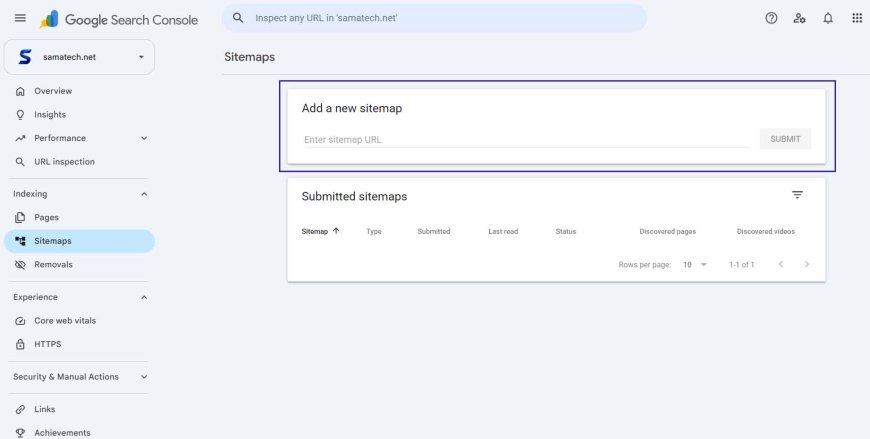
It is worth noting that submitting a sitemap helps Google discover your URLs, but it does not guarantee that all pages will be indexed or appear in search results.
Second: Optimize Your Website Content for Search Engines
1. Conduct Thorough Keyword Research
Keyword research is an important step when creating content for search engines. It helps you understand the words and phrases your target audience uses when searching for information, products, or services related to your website’s industry. By identifying relevant keywords and understanding the search intent behind users’ queries, you can create content that better matches your audience’s interests and needs, giving your pages a better opportunity to reach users and appear in search results.
To conduct thorough keyword research, start by identifying the main topics related to your website’s industry. Then, research the words and phrases people use when searching for information about these topics. You can make use of search engine suggestions and related searches, and then use specialized tools to obtain more accurate data about search volume, competition, and related keywords.
Some of the most useful tools include Google Keyword Planner and Google Trends, both of which are free tools that can help you discover the keywords and topics users are searching for. You can also use paid tools that provide more advanced data and analysis, such as Ahrefs and Semrush, as well as Ubersuggest, which offers both free and paid features.
After collecting and analyzing keywords, choose the ones that are most relevant to your website’s content and your audience’s needs. Then, use them naturally when creating content, focusing on providing a useful and comprehensive answer to the user’s query rather than excessively repeating keywords.
2. Create an Effective Content Plan
After completing your keyword research, the next step is to plan the content you will provide to your audience. Simply choosing keywords is not enough. It is also important to determine which topics you will cover, what type of content is appropriate for each topic, and what goal you want to achieve with each piece of content.
Start by grouping the keywords you have collected into topic-related clusters. Then, identify the pages and articles that can be created based on these groups. After that, create a schedule for publishing content regularly, specifying the topic, target keyword, and goal of each piece of content.
Having a clear content strategy helps you avoid publishing random or repetitive content. It also ensures that you cover important topics related to your website’s industry and provide a variety of content that meets your audience’s needs.
3. Write High-Quality and In-Depth Content
After identifying your keywords and developing a content strategy, it is time to write the actual content. Make sure your content provides useful and comprehensive information that answers the questions users are searching for. It should also be well-organized and easy to read, with clear headings and paragraphs.
High-quality content is not simply about its length. What matters is its ability to provide accurate and useful information that covers the topic sufficiently and delivers genuine value to the reader. It is also recommended to avoid unnecessary filler and repeating information simply to make the article longer. Instead, focus on providing clear and direct content that satisfies the user’s search intent.
4. Improve Content Using Artificial Intelligence
AI tools can be useful for improving content after it has been written. They can help review and refine text, identify language errors, suggest titles and ideas, organize content, and identify areas that require further clarification. However, it is better to use artificial intelligence as an assisting tool in the content creation process rather than as a replacement for expertise and human review. This ensures that the information is accurate and appropriate for the target audience before publication.
Third: Optimize Website Pages for Search Engines
After setting up the website and creating high-quality content, the next step is to optimize the pages themselves to ensure that their content is clear and well-organized in a way that helps both users and search engines understand it. This stage includes several elements that can be optimized within each page or article, such as titles, descriptions, headings, links, images, and content structure.
-
Optimize the Page Title: Make the page title clear and accurately reflect its content. It is recommended to include the primary keyword naturally so that both users and search engines can easily understand what the page is about.
-
Optimize the Meta Description: Write a concise description that explains the page content and gives users an idea of what they will find when they visit it. It should also be written in a way that encourages users to click on the page from search results.
-
Organize Headings Within the Content: Use main and subheadings such as H1, H2, and H3 to organize the content and divide it into clear sections. This makes the content easier to read and helps users understand its structure.
-
Use Keywords Naturally: Distribute the primary keyword and related phrases naturally throughout the title, content, and headings. Avoid excessive keyword repetition or keyword stuffing.
-
Optimize Images: Use images that are relevant to the content and reduce their file sizes as much as possible. Use descriptive file names and add alternative text (Alt Text) when appropriate to describe the image content.
-
Use Internal Links: Add links connecting the page to other relevant pages and articles on your website. This helps visitors discover additional content related to the topic.
-
Use Relevant External Links: When appropriate, reference trustworthy and relevant sources related to the topic of the page. This can provide users with more useful information and support your content with appropriate sources.
-
Improve Content Readability: Divide the text into clear paragraphs, and use lists and headings when appropriate. Avoid overly long paragraphs that can make the content more difficult to read.
By applying these improvements to your website pages, they become clearer, better organized, and more useful to visitors. These optimizations also help search engines better understand the content and topic of each page. It is important not to focus on a single element, but rather to optimize these elements together to achieve the best possible results and improve the chances of your pages appearing in search results.
Fourth: Optimize the Website’s Technical Aspects for Search Engines
Optimizing a website for search engines is not limited to content and keywords. It also includes technical aspects that help search engines access and better understand the website’s pages. Some of the most important aspects include ensuring that the website works properly across different devices, improving page loading speed, creating a sitemap, and making sure there are no pages or links that cause problems for search engines.
It is also recommended to use the HTTPS protocol to secure the website connection, ensure that search engines can access important pages, and fix broken links and errors that may affect crawling and indexing. These practices help create a well-organized technical structure that makes the website easier for search engines to access and understand.
Fifth: Optimize Off-Page SEO
Off-Page SEO includes a range of activities performed outside your website with the goal of improving its credibility and reputation in the eyes of search engines. One of the most important of these activities is obtaining backlinks from other trustworthy websites that are relevant to your website’s industry.
It is not only about the number of backlinks, but also about the quality of the websites linking to your site and how relevant they are to its topic. Publishing content and promoting your website across different platforms can also help it reach a new audience and increase its chances of receiving mentions and backlinks from other websites. In general, building a strong presence outside your website can enhance its credibility and increase its chances of appearing in search results.
Sixth: Advanced and Continuous SEO Optimization
SEO is not a one-time process that ends after implementation. Instead, it requires continuous monitoring, analysis, and improvement. Competition changes, user needs evolve, and search engine algorithms are updated over time. Therefore, it is important to monitor your website’s performance and identify areas that need improvement.
This can include monitoring keyword rankings, analyzing traffic and performance, updating old content, identifying pages that are not performing well, reviewing internal and external links, and addressing technical issues that may arise over time. By continuously analyzing and improving your website, you can determine what is working well and what needs further development, helping maintain and improve your website’s performance in search engines over time.
Conclusion
In this guide, we covered the most important steps and practices for improving the visibility of a WordPress website in search engines, starting with technical website configuration, setting up permalinks and an XML sitemap, conducting keyword research, creating high-quality content, and optimizing website pages, followed by improving Off-Page SEO and continuously monitoring and developing website performance.
SEO is an ongoing process that requires a combination of technical optimization, high-quality content, and external SEO practices, along with continuous monitoring and analysis of results. By implementing these practices correctly, you can build a strong foundation that helps improve your website’s visibility and reach your target audience more effectively.
We hope this guide has provided you with a clear and useful overview of SEO for WordPress websites and helped you understand the steps you can take to improve your website and strengthen its presence in search results.