





Introduction
Website speed is a cornerstone of any successful online presence. It not only affects how quickly content is displayed, but also has a direct impact on user experience, visitor trust, and overall website performance. When users are looking for information, a service, or a product, they expect to find what they need quickly and easily. Any delay in page loading can cause them to leave the website and look for an alternative.
Statistics show that websites that load within one second can achieve conversion rates up to five times higher than websites that take ten seconds to load. Three or four additional seconds may seem insignificant, but in the world of the web, this is a considerable amount of time. During these few seconds, visitors may lose patience and leave the website before viewing its content or taking an action, such as purchasing a product or contacting you.
Therefore, every second saved in website load time contributes to a better user experience, increases the chances of retaining visitors and converting them into customers, and makes website speed a key factor in the success of any website.
For this reason, improving website speed should be a priority, as it has a direct impact on both user experience and website performance. This can be achieved by implementing a range of optimization techniques, such as compressing images, enabling caching, optimizing the database, and applying other practices that help reduce page load times, improve website performance, and enhance visibility in search engine results.
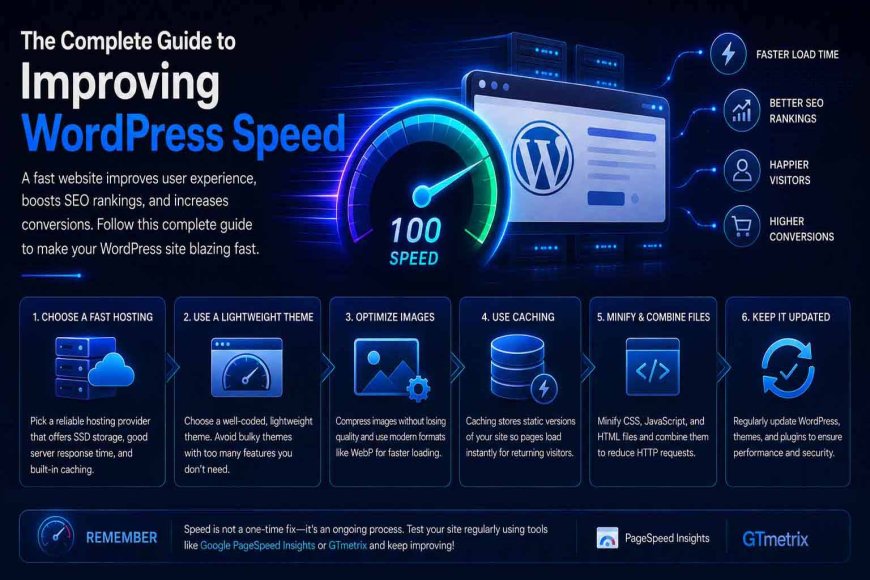
In this guide, we will explore the most effective ways to speed up a WordPress website step by step, along with an explanation of each method and the best practices for implementing it. But before we get started, let's first understand why website speed is important and how it can directly affect the success and growth of your website.
Why Is Website Speed Optimization Important?
-
Improving User Experience (UX): Website speed has a direct impact on user experience, as visitors expect pages to load quickly and be easy and smooth to navigate. The faster a website is, the more comfortable users are while browsing, increasing the likelihood that they will stay longer and interact with its content. On the other hand, if a website is slow and suffers from delayed page loading or difficult navigation, visitors may become frustrated and leave before exploring the content or taking any action. This can negatively affect the website's performance and results.
-
Reducing Bounce Rate: When a website takes too long to load, visitors are more likely to leave before viewing or interacting with its content, resulting in a higher bounce rate. A fast website, on the other hand, provides a better browsing experience, helps reduce visitor abandonment, and increases the chances that users will engage with the content and navigate through different pages for longer.
-
Increasing Conversion Rates and Sales: Website speed has a direct influence on user decisions. The faster a website loads and responds, the more likely users are to complete purchases, sign up for services, or submit contact forms, which can increase conversion rates and revenue. A slow website, however, may frustrate visitors and cause them to leave before completing a purchase or abandon their shopping carts, resulting in lower sales and lost potential customers.
-
Reducing Server Resource Usage: Optimizing website performance can reduce server resource consumption by minimizing the number of requests sent, improving resource loading, and eliminating unnecessary processes. This reduces the load on the hosting environment and improves website stability.
-
Improving SEO and Search Engine Rankings: Website performance and page load speed can have a positive impact on its visibility in search engine results. Website speed and user experience are among the factors that help search engines evaluate the quality of a website. Therefore, improving website performance can contribute to better rankings, increase the chances of appearing in front of users, and attract more organic traffic. A slow website, on the other hand, can lead to a poor user experience, a higher bounce rate, and reduced opportunities to appear prominently in search results, ultimately limiting potential visitors.
Now that we understand the importance of website speed and its impact on website performance and user experience, let's take a look at the factors and causes that can slow down a website and affect its efficiency.
What Factors Affect Website Loading Speed?
-
Poor Web Hosting: Web hosting is one of the most important factors affecting website speed. It provides the infrastructure that a website relies on to operate and deliver its services to users. Regardless of the quality of the code, the level of file optimization, or the efficiency of the website's design, performance will not reach the desired level if the hosting environment is weak or lacks the necessary resources and technologies. Hosting is particularly important because it is responsible for storing website files and databases, processing visitor requests, and delivering data to users' browsers as quickly as possible.
-
Database Issues: The database is another key component that can affect website speed. Large amounts of data or poorly optimized queries can slow down the process of searching for and retrieving information from the server. When database requests take longer to process, the website requires more time to load pages and display content to users, negatively affecting response times and the browsing experience. Therefore, organizing the database and optimizing queries can improve website efficiency and reduce loading times.
-
Images: Images are among the elements that have the greatest impact on website performance and speed. They can be a major cause of slow page loading when they are not properly optimized. Using high-resolution images with large file sizes or uncompressed formats increases the amount of data that the browser needs to download. This results in longer page load times and puts additional pressure on hosting server resources. It can also consume more of the user's data, especially when browsing on smartphones, which may lead to a poor user experience and encourage visitors to leave the website.
-
The WordPress Theme: The WordPress theme you use can have a direct impact on website speed. Some themes contain a large number of code files and additional elements, such as visual effects, unnecessary features, and complex code, which are loaded with every page. This increases page size and the number of requests sent by the browser to the server, resulting in slower content loading and reduced website responsiveness. Therefore, using a poorly optimized theme can negatively affect website performance and user experience, particularly for visitors using slower internet connections or less powerful devices.
-
Too Many Plugins: Using a large number of plugins and third-party scripts can increase page processing time and slow down a website. Each plugin or external script may need to be loaded and executed when a page is opened, increasing the number of requests sent to the server and browser and consuming website resources. Some plugins may also contain poorly optimized code or rely on slow external servers, which can delay page loading and reduce website responsiveness.
-
Outdated WordPress: Failing to update WordPress, plugins, and themes can affect website speed and performance. Older versions may contain inefficient code or software bugs that increase server resource consumption and slow down processes. New updates often include performance improvements, such as faster code execution and reduced memory usage, as well as fixes for issues that may cause website slowdowns. Therefore, neglecting updates can reduce website efficiency, slow down page loading, and create compatibility issues between plugins and the active theme.
-
Third-Party Scripts: External scripts, such as advertising scripts, analytics tools, and third-party font services, can affect website speed because they require connections to external sources and additional files to be loaded when a page is opened. The more third-party scripts a website uses, or the slower the servers providing them are, the longer it takes to fully load the page, resulting in slower website performance.
Now that we have covered the importance of WordPress speed and the factors that affect website performance, let's move on to the tools you can use to measure website speed and evaluate overall performance.
Website Speed Testing Tools
There are many specialized tools available for measuring website speed and analyzing performance. These tools examine how pages load, identify elements that cause slowdowns, and provide recommendations for improving performance. Some of the most popular tools include:
-
Google PageSpeed Insights: A free tool provided by Google that analyzes the performance of web pages and measures their speed on both desktop and mobile devices. It evaluates various factors that affect website speed, including page load time, how quickly content becomes visible, file sizes, and the way images and code are loaded, as well as user experience.
After the analysis is complete, the tool provides a report showing the performance score, identifying issues that affect speed and offering practical recommendations for improving the website according to modern performance standards. Its ease of use and clear reports make it useful for website owners and developers who want to identify performance weaknesses and measure the impact of implemented optimizations.
-
GTmetrix: A specialized tool for analyzing website performance and providing detailed reports on how pages load and which elements affect their speed. It examines several performance-related factors, including file sizes, the number of browser requests, server response time, and the performance of images, CSS, and JavaScript files. It also provides results and recommendations that help identify the causes of slowdowns and determine the appropriate steps to improve website speed. Its detailed reports help website owners and developers understand the different stages of page loading and identify elements that require optimization, making it easier to improve performance and reduce load times.
-
WebPageTest: A free, specialized tool for testing website speed and analyzing page loading in detail. It allows users to run tests from different geographic locations and with various devices and connection speeds, making it possible to evaluate website performance under different conditions. The tool also provides information about page load time, server response time, and the loading sequence of different files and elements. This data can help identify issues that may not appear when testing from a single location, particularly for websites that receive visitors from different geographic regions. This ultimately helps improve user experience and overall website performance.
-
Pingdom Website Speed Test: An easy-to-use tool for measuring website speed and analyzing the elements that affect page load times. It provides important information such as page size, the number of requests made, and server response time, while also identifying files and elements that take longer to load. These results can help identify sources of slowdowns and determine how to optimize them. The tool is also known for its simple reports and easy-to-understand results, making it suitable for website owners and beginners who want to understand the causes of slow website performance and take appropriate steps to improve it.
Regular performance testing helps maintain website speed over time because websites are constantly changing due to the addition of new content, installation of new plugins, or theme updates, all of which can affect performance. Therefore, speed optimization is an ongoing process that relies on continuous testing, analysis, and optimization.
Now that we have covered the tools used to measure website speed, analyze performance, and identify issues that affect page load times, let's move on to the practical methods and techniques that can help speed up a WordPress website and improve its overall efficiency.
How to Speed Up WordPress?
1. Choose a Powerful and Suitable Hosting Provider
If you already have a hosting plan, it is recommended to evaluate its performance by first monitoring your website speed from the user's perspective. Website speed is an important indicator of hosting quality. You can do this by accessing your website from different locations and testing its performance, then using speed testing tools to measure page load times and monitor how long the server takes to start sending data. If the server response time is high, this may indicate an issue with the available server resources or its configuration.
Next, access your hosting control panel and review your server resource usage, including CPU, RAM, storage space, and the number of active processes. If resource usage frequently reaches its limits, this indicates that your current hosting plan may not provide enough resources to handle your website's traffic and requirements.
In this case, you can improve performance by upgrading to a hosting plan with more resources or moving your website to another hosting provider that offers the performance and capabilities required by your website.
2. Use a Lightweight and Optimized Theme
Choosing a lightweight and professionally coded WordPress theme is one of the most important factors affecting website speed and performance. Poorly optimized themes often contain unnecessary code and features, which increase page size and the number of files that browsers need to load, ultimately resulting in longer page load times.
A lightweight theme, on the other hand, relies on clean and well-organized code and loads only the elements required to display the content. This reduces resource consumption on both the server and the browser, helping pages load faster, reducing response times, and providing visitors with a better browsing experience.
3. Reduce the Number of Plugins
Reducing the number of plugins installed on your website is an important step toward improving performance. Each plugin can add new files and code, such as JavaScript and CSS files, as well as additional database queries. When a user visits the website, these files may need to be loaded and certain processes executed, increasing the time required to display the page.
Some plugins also perform tasks continuously in the background rather than only when requested by the user. Examples include security plugins that monitor the website, backup plugins that perform scheduled operations, analytics plugins that collect visitor data, and certain content management plugins.
These processes consume server resources such as CPU and memory and may increase the number of operations and database queries performed by the website. Therefore, using too many plugins—particularly unnecessary or poorly optimized ones—can increase server load, slow down the processing of visitor requests, delay page loading, and reduce website responsiveness.
For this reason, it is recommended to use only essential plugins and choose lightweight, regularly updated plugins from trusted developers. You should also remove any plugins that are no longer in use. Removing unnecessary plugins reduces the number of files and scripts loaded by the website and eliminates background processes that consume server resources.
This helps reduce CPU and memory usage, resulting in faster page loading and improved website responsiveness.
4. Optimize and Compress Images
Images and other visual assets are among the elements that have the greatest impact on website performance and speed. Using large images without proper optimization can be a major cause of slow page loading. When high-resolution images have large file sizes or are saved in uncompressed formats—for example, images that are 1 or 2 MB in size—the browser needs to download more data to display the page. This increases loading times and consumes additional hosting server resources.
Therefore, images should be optimized before being used by compressing them and reducing their file size while maintaining an appropriate level of quality. It is also recommended to use modern image formats such as WebP, which generally provide smaller file sizes than traditional formats.
These optimizations reduce the amount of data that browsers need to download, helping pages load faster and improving website responsiveness.
5. Enable Caching
Caching is one of the most important techniques for improving website speed and performance. It works by creating and storing copies of frequently requested pages and data in a temporary storage layer. This allows the content to be delivered to visitors more quickly without requiring the server to execute all the underlying processes or query the database from scratch every time.
When a user visits a page for the first time, the server generates the page and stores a cached copy. On subsequent visits, the stored version can be delivered much faster.
Think of it as saving the final answer to a frequently asked question instead of solving the same problem from scratch every time someone asks it. For this reason, caching is an essential component of a fast and efficient website, as it helps reduce load times, lower server load, and significantly improve overall website performance.
6. Use a Content Delivery Network (CDN)
A Content Delivery Network (CDN) is an important technology for speeding up websites and delivering content more quickly to visitors around the world. A CDN stores copies of website files, such as images, JavaScript files, CSS files, and other static assets, on a network of servers distributed across different geographic locations.
When a user requests access to a website, the CDN can deliver these files from a server located closer to the user instead of retrieving them from a distant origin server. This reduces the distance data needs to travel, speeds up the loading process, and improves website performance.
You can think of a CDN as having multiple warehouses for the same product in different cities. Instead of shipping an order from a distant warehouse, the order is fulfilled from the warehouse closest to the customer, allowing it to arrive faster.
The benefits of a CDN go beyond simply speeding up a website. It can also reduce the load on the origin server by handling a significant portion of visitor requests. This improves website stability and allows the site to handle a larger number of users simultaneously.
7. Clean and Optimize the Database
Cleaning and optimizing the database is an important step in maintaining website speed and efficiency. The database serves as the primary storage system for the information and data required by the website, including system settings, user data, articles, orders, and other content.
Over time, unnecessary data can accumulate in the database, such as temporary records, old revisions, and leftover data from deleted plugins and themes. This can make the database larger than necessary and slow down searches, queries, and request processing.
This can be compared to an office filled with old, disorganized files. The more clutter there is, the longer it takes to find the file you need. Once the files are cleaned up and organized, information can be accessed more quickly and efficiently.
Therefore, regularly optimizing the database helps reduce its size, speed up query execution, and reduce server load, which directly improves website speed and stability. Database optimization should be considered an essential part of an overall performance optimization strategy, alongside caching and Content Delivery Networks (CDNs), to ensure that the website operates as efficiently as possible.
8. Keep WordPress, Plugins, and Themes Updated
Regularly updating WordPress, plugins, and themes is essential for maintaining website speed, security, and stability. Updates are not limited to introducing new features; they often include performance improvements, bug fixes, and improvements to the underlying code that make it more efficient.
Over time, outdated versions of WordPress, plugins, or themes may become incompatible with modern technologies. This can lead to reduced website performance, operational issues, and an increased risk of security vulnerabilities that could potentially be exploited.
This is similar to using a device running outdated software. Over time, old software can become less efficient and negatively affect the device's performance, while regular updates help improve performance, fix issues, and keep the system running more effectively.
Plugin and theme updates can also reduce compatibility issues, improve server resource usage, and ensure that the website remains compatible with the latest supported versions of PHP, database technologies, and modern web standards.
Therefore, keeping WordPress and all of its components regularly updated is an important part of a website performance optimization strategy. It helps maintain a faster, more secure, and more stable website over the long term.
9. Reduce Third-Party Scripts and External Resources
Reducing third-party scripts and external resources is an important step in improving website loading speed. Many websites rely on additional resources such as advertisements, external fonts, analytics tools, and scripts provided by third-party services.
Although some of these resources may be necessary, using too many of them increases the number of requests the browser must process before the page can finish loading. Each external resource may require additional time to establish a connection to its server and download the required files, increasing the overall page load time.
Therefore, regularly reviewing third-party scripts and external resources, removing unused elements, and reducing reliance on unnecessary advertisements, external fonts, and third-party tools can help reduce the number of browser requests and speed up page loading.
This can improve overall website performance while also reducing the workload placed on both the server and the browser.
10. Enable Lazy Loading
Lazy loading is an important technique for improving website loading speed. It works by loading images and videos only when they are needed instead of loading all page content at once.
When a visitor opens a page, only the elements currently visible on the screen are loaded. Other elements located further down the page are loaded later when the visitor scrolls down and reaches them.
This approach reduces the amount of data that needs to be loaded initially, allowing the visible portion of the page to appear faster and improving overall website performance, especially on pages containing a large number of images and other media.
11. Use the Latest Supported Version of PHP
Using a recent supported version of PHP is an important step in improving WordPress performance. The way a website operates and how quickly it executes its code depend heavily on the PHP version running on the server.
Newer PHP versions generally improve code processing, increase execution speed, and reduce resource consumption compared with older versions. This means that a website can process more requests efficiently, which can directly improve page load times and website responsiveness.
This can be compared to using a modern computer instead of an older one to perform the same task. Both devices may be capable of completing the task, but the newer one can generally perform it faster and with greater efficiency. Similarly, running WordPress on a recent PHP version can help plugins, themes, and WordPress itself execute more efficiently.
Therefore, keeping PHP updated to a modern, supported version is an important part of website performance optimization. It can improve execution speed, reduce server load, and contribute to better overall website stability.
Conclusion
WordPress speed is one of the key factors that can influence a website's success, user experience, and overall performance. It is not only about how quickly pages load, but also about improving visitor engagement, reducing bounce rates, supporting search engine visibility, and making more efficient use of hosting resources.
Improving website speed requires a comprehensive approach that includes choosing suitable hosting, using a lightweight and optimized theme, optimizing images and code, enabling caching, using a CDN, cleaning and optimizing the database, reducing unnecessary plugins and third-party resources, and keeping WordPress, plugins, themes, and PHP up to date. Regularly testing and monitoring website performance is also essential for identifying potential issues and maintaining optimal speed over time.
Throughout this guide, we explored the importance of website speed, the main factors that can affect WordPress performance, the most effective ways to speed up WordPress, and the tools that can help measure performance and identify areas for improvement.
By understanding these factors and applying the right optimization techniques, you can build a faster, more stable, and more efficient WordPress website while providing visitors with a smoother browsing experience.
We hope this comprehensive guide has provided you with the information and practical steps you need to improve WordPress speed and maintain better website performance over the long term.