





Introduction
Website speed is one of the most important factors that determine the success of any website. It directly affects user experience, engagement, conversion rates, and search engine rankings. When a website takes too long to load, visitors may become frustrated and find it difficult to navigate between pages or access content quickly. This increases the likelihood that they will leave before interacting with the site, which can increase bounce rates and negatively affect the website’s ability to achieve its goals.
For this reason, improving website speed has become essential for anyone looking to provide a professional website with fast performance and high stability. Page load speed is no longer simply an added advantage; it has become a fundamental part of delivering a smooth user experience that meets visitors’ expectations across different devices, including smartphones, tablets, and desktop computers.
Search engines, particularly Google, also place significant importance on website performance. Website speed is one of the factors considered when evaluating the overall quality and performance of a website in search results. Fast websites provide a better experience for users, which aligns with Google’s goal of delivering high-quality results and experiences to its users. As a result, websites with strong performance may have better opportunities to perform well in search results than slower websites. Website speed can also contribute to more efficient crawling and indexing while reducing the amount of server resources required to deliver content.
In this guide, we will provide a comprehensive overview of how to improve website speed, covering the key factors that affect website performance as well as the best tools and practices for reducing load times and improving overall efficiency. Before exploring specific optimization techniques, however, it is important to understand why website speed matters and why it has become an essential part of improving user experience and strengthening a website’s search visibility.
Why Is Website Speed Important?
1. Improving User Experience
User experience is one of the most important factors in determining the success of a website because it directly affects visitor satisfaction and how easily users can interact with the site. When a website loads quickly, users can access the information or services they need without unnecessary delays. This creates a more convenient experience, increases trust in the website, and encourages users to continue browsing or return in the future.
Website speed can also increase engagement and help websites achieve their goals, whether that means making a purchase, completing a registration, or exploring additional content. On the other hand, a slow website can frustrate users due to long loading times, potentially causing them to leave and look for a faster alternative. This can reduce user satisfaction and decrease the likelihood of visitors interacting with the website or using its services.
If users leave a website quickly because its pages take too long to load, this may indicate that the website is not providing a satisfactory user experience. For this reason, website speed is an essential component of user experience. A fast website helps create a positive browsing experience while supporting the overall success of the site.
2. Improving SEO and Search Engine Visibility
Website speed plays an important role in SEO and overall search performance. Google considers page experience and performance among the factors that can influence how websites perform in search results. A fast website provides users with a better experience and allows them to access content more efficiently.
Website performance can also affect how efficiently search engines crawl and process a website. When pages load efficiently and the site's technical infrastructure is well optimized, search engine crawlers can access and process content more effectively.
Google also introduced Core Web Vitals, a set of performance metrics designed to measure important aspects of the user experience, including loading performance, responsiveness, and visual stability. These metrics are part of Google's broader page experience signals and highlight the importance of providing a fast, responsive, and stable website.
Therefore, website speed should not be viewed as an optional feature. It is an important part of a comprehensive SEO strategy and plays a key role in creating a better experience for both users and search engines.
3. Increasing Sales and Conversion Rates
Website speed is closely connected to sales and conversion rates, particularly for e-commerce websites. In today's digital environment, users expect websites to load quickly and respond smoothly. Even small delays can create friction during the buying process and increase the likelihood that potential customers will abandon the website before completing a purchase.
When visitors become frustrated by slow loading times, they may leave the website and turn to a competitor that offers a faster and smoother experience. This can cause businesses to lose valuable opportunities to turn website traffic into actual customers.
Fast websites, on the other hand, create a more convenient and trustworthy shopping experience. They make it easier for customers to browse products, navigate between pages, and complete the checkout process without unnecessary delays or interruptions. A smoother experience can help reduce cart abandonment and improve conversion rates, making website performance an important investment for businesses looking to increase revenue and achieve sustainable growth.
The importance of website speed is not limited to e-commerce websites. It applies to virtually every type of website. Faster websites can encourage visitors to explore more content and increase the likelihood of completing desired actions, such as registering for an account, submitting a form, contacting the business, or viewing additional pages.
4. Increasing User Satisfaction
Website speed can significantly improve user satisfaction by making the overall browsing experience faster, easier, and more convenient. When pages load quickly, visitors can access the information, products, or services they are looking for without unnecessary delays or frustration. This can increase their confidence in the website and create a more positive impression of the business.
A fast website can also reduce the likelihood of users leaving before completing an important action, such as browsing products, registering, or making a purchase. It allows visitors to complete tasks more efficiently and creates the impression that the business prioritizes quality and provides a professional digital experience.
As a result, improving website speed can contribute to higher user satisfaction and increase the likelihood that visitors will return to the website in the future.
After understanding the importance of website speed and its impact on user experience and search visibility, we can now move on to the key factors that affect website performance.
It is important to note that these factors are not limited to WordPress websites. They apply to virtually all types of websites, whether they are built using content management systems such as WordPress, developed with custom code, or created using other web technologies.
Factors That Affect Website Speed
1. Hosting and Server Performance
Web hosting is one of the most important factors affecting website speed. It provides the infrastructure a website relies on to operate and deliver its content and services to users. Regardless of how well a website is coded, how effectively its files are optimized, or how well it is designed, its performance can still suffer if the hosting environment is underpowered or lacks the necessary resources and technologies.
The importance of web hosting comes from its role in storing website files and databases, processing visitor requests, and delivering data to users’ browsers as quickly as possible. This makes hosting quality a key factor in determining website speed, responsiveness, and overall performance.
How Does Hosting Affect Website Speed and Performance?
Web hosting serves as the foundation of a website’s technical infrastructure. It is where website files and databases are stored and where user requests are processed. As a result, the quality of the hosting environment can directly affect page load times, website stability, and the ability to handle increasing levels of traffic.
The following are some of the most important hosting-related factors that can affect website speed.
- Server Response Time (TTFB): Time to First Byte (TTFB) refers to the amount of time it takes for a server to begin sending data to a user’s browser after receiving a request. It is an important indicator of server responsiveness because it reflects how quickly the server begins processing and responding to requests. A lower TTFB generally allows page loading to begin sooner, contributing to a faster user experience and better overall website performance.
- Data Center Location: The geographic location of the data center can have a significant impact on website speed. When a server is located close to the website’s target audience, data has a shorter distance to travel between the server and the user. This reduces network latency and can improve page load times. If the server is located far away from most visitors, network latency may increase, potentially resulting in slower response times.
- Storage Type: The type of storage used by the hosting server can also affect website performance. Storage systems are responsible for storing website files and databases and retrieving data when it is requested. Faster storage allows the server to access and process data more quickly, which can improve server responsiveness and page loading performance.
Traditional HDD storage is generally slower when reading and retrieving data, particularly when a website receives high traffic or performs frequent database operations. In contrast, modern storage technologies such as SSD and NVMe offer significantly faster read and write speeds, allowing servers to access files and database data more efficiently and improving overall website responsiveness. - Server Resources: The resources allocated to a website, including CPU, RAM, and network capacity, directly affect how quickly the server can process requests. Adequate and reliable resources allow the server to handle operations more efficiently, helping reduce processing delays and maintain consistent website performance, particularly during periods of increased traffic.
- Server Software: Server software also plays an important role in website performance. Modern hosting environments may use high-performance web servers such as LiteSpeed and Nginx, which are designed to handle web requests efficiently. Using up-to-date versions of technologies such as PHP can also improve application performance and resource efficiency, depending on how the website is built and configured.
- Data Transfer Protocols: Modern web protocols such as HTTP/2 and HTTP/3 can improve the efficiency of communication between browsers and servers. They support more efficient delivery of multiple resources and can reduce the overhead involved in establishing and managing connections. This can help websites load resources such as images, CSS, and JavaScript more efficiently, particularly on pages that contain many files.
- Server-Side Caching: Server-side caching can significantly improve website speed by reducing the amount of processing required for repeated requests. Instead of generating the same page from scratch every time a visitor requests it, the server can store a ready-to-deliver version of the content. When another user requests the same page, the cached version can be served more quickly, reducing server processing time and improving response speed.
- Hosting Optimization Features:
Some modern hosting providers offer built-in features designed to improve website performance. These may include file compression technologies such as Gzip and Brotli, which reduce the amount of data transferred between the server and the user’s browser and can help pages load faster. Some hosting services also offer integration with a Content Delivery Network (CDN). A CDN stores cached copies of website resources on servers distributed across different geographic locations. When a user requests content, it can be delivered from a server that is geographically closer to them, reducing latency and potentially improving load times.
Key Takeaway
Website speed does not depend solely on the quality of its code or design. It also starts with choosing a reliable hosting environment supported by modern infrastructure and appropriate technologies.
Every factor discussed above—from server response time and data center location to storage technology, server resources, web protocols, and caching—can contribute to a faster and more stable website.
For this reason, choosing the right hosting solution should be considered an essential investment in improving user experience, maintaining reliable website performance, and supporting long-term SEO and business goals.
2. Website File Size
The size of a website’s files is one of the key factors that directly affects its loading speed and overall performance. These files—including large images, extensive code, and multiple design resources—represent the amount of data that the server must deliver to the visitor’s browser over the internet.
When website files are unnecessarily large or poorly optimized, they take longer to transfer from the server to the user’s device. This becomes particularly noticeable for visitors using slower or less reliable internet connections, such as mobile networks.
For example, uploading high-resolution images in their original format without compressing them or resizing them to appropriate dimensions can add a significant amount of data to a webpage. The browser then needs to download and process each image before it can be displayed, increasing the page’s loading time.
Similarly, large and poorly optimized CSS and JavaScript files can increase the amount of data that browsers need to download and process. Unnecessary code, excessive whitespace, and inefficiently organized resources can contribute to larger file sizes and additional processing, delaying content rendering and negatively affecting the overall user experience.
3. Image Size and Quality
Images are among the elements that can have the greatest impact on website speed and performance. In many cases, large and poorly optimized images are a major contributor to slow page loads.
When a website contains high-resolution images with large file sizes or inefficient formats, visitors’ browsers must download and process a significant amount of data before the page can be fully displayed. This increases loading times, consumes more bandwidth—particularly on mobile devices—and can create a frustrating browsing experience that may cause visitors to leave.
For example, uploading a photograph taken with a modern camera at several megabytes in size without resizing or compressing it means that the browser must download and process a large file when the page is opened. The impact becomes even greater when a page contains multiple large images.
4. Code Quality and Organization
The quality and structure of a website’s code play an important role in determining its speed and overall performance. Poorly written or inefficient code can require more processing from the server and browser, resulting in longer response and rendering times.
For example, duplicated code, unnecessary scripts, or JavaScript that is poorly organized or loaded at the wrong time can interfere with the browser’s rendering process and delay the display of important content. Similarly, inefficient or unnecessarily complex database queries can slow down server responses by consuming resources and performing operations that could otherwise be optimized.
Well-structured, efficient code helps reduce unnecessary processing, improve resource usage, and create a more responsive website.
5. Database Performance
Databases play an important, although often less visible, role in determining website speed and performance. They store much of the dynamic content and information that websites rely on. When a user requests a page, the server may need to query the database to retrieve content such as text, product information, comments, user accounts, and other data.
If a database becomes poorly organized, unnecessarily large, or burdened with outdated or redundant data, queries may take longer to execute. This can increase server processing time and contribute to slower response times, including a higher Time to First Byte (TTFB).
For example, large e-commerce websites and content-heavy blogs may contain thousands of products, posts, or other records. Without properly designed and maintained database indexes, the database may need to examine a large number of records to find the required information. This can increase query execution time and delay pages that depend on those queries.
In addition, excessive plugins, repeated database queries, or unnecessarily complex queries can place additional load on the server. Over time, this can consume server resources and make pages slower to generate and deliver to visitors.
How to Improve Website Speed
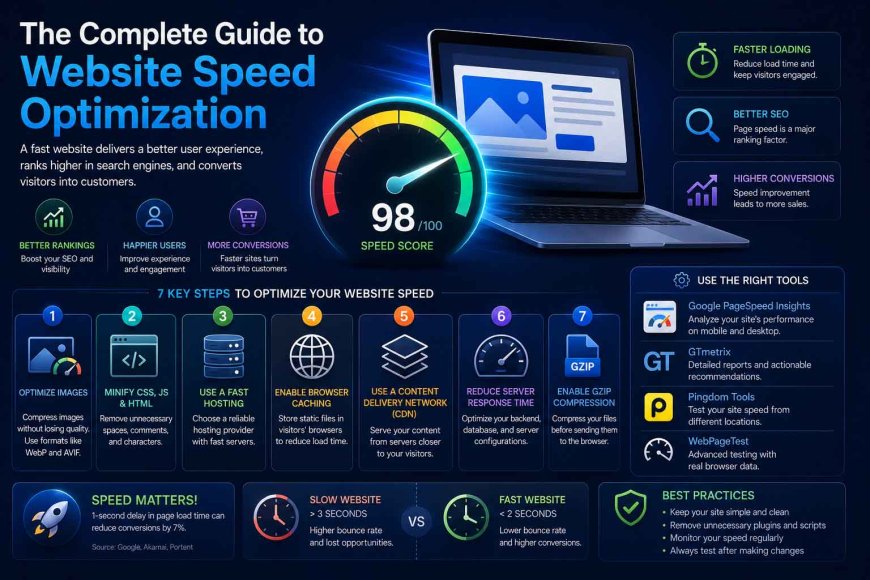
There are several techniques and practices that can help improve website speed and overall performance. Some of the most effective include:
- Choose High-Quality Hosting: Web hosting is one of the most important factors affecting website speed. Even after implementing various optimization techniques, a website may remain slow if its hosting environment is underpowered or does not provide sufficient resources. Choosing reliable hosting with fast servers and adequate resources can reduce server response times and significantly improve overall performance.
- Optimize and Compress Images: Images are among the most influential elements when it comes to page loading speed, particularly when they are large or poorly optimized. Compressing images and reducing their dimensions while maintaining acceptable visual quality can significantly reduce file sizes. Using modern image formats such as WebP can also help reduce the amount of data that needs to be downloaded.
- Use Caching: Caching stores temporary or reusable copies of website resources and pages, reducing the need to generate or retrieve the same content repeatedly. This can speed up page delivery, reduce server workload, and improve performance for returning visitors.
- Reduce CSS and JavaScript File Sizes: Modern websites often rely on multiple CSS and JavaScript files, some of which may contain unnecessary code or unused resources. Minifying these files, removing unnecessary code, and optimizing how they are loaded can reduce the amount of data the browser needs to download and process, helping pages load more efficiently.
- Optimize the Website Database: Website databases can accumulate unnecessary data, outdated records, and other information over time. This can increase database size and affect query performance. Regular database maintenance, including removing unnecessary data and optimizing database structures and queries, can help improve response times and overall website performance.
- Use a Content Delivery Network (CDN): A Content Delivery Network distributes cached website resources across servers in different geographic locations. This allows users to retrieve content from a server that is closer to their location, which can reduce latency and improve loading performance.
- Enable Lazy Loading: Lazy loading delays the loading of images, videos, and other non-critical resources until they are needed. Instead of loading every element on a page immediately, the browser can prioritize the content visible in the initial viewport and load additional resources as the user scrolls.
This reduces the amount of data that needs to be loaded initially, allowing important content to appear sooner. Lazy loading can be particularly beneficial for pages containing many images or other media elements. - Monitor Website Performance Regularly: Website speed optimization is not a one-time task. Continuous monitoring is necessary to identify new performance issues and address them before they negatively affect the user experience or overall website performance.
Key Takeaway
Improving website speed does not depend on a single optimization technique. Instead, it requires a combination of improvements, including optimizing files, reducing unnecessary requests, improving server performance, optimizing databases and content, and continuously monitoring website performance.
By implementing these practices effectively, you can create a faster and more stable website that provides a better user experience, supports stronger search performance, and increases the likelihood of achieving your website’s goals.
After understanding the importance of website speed, the key factors that affect performance, and the main techniques used to improve it, the next step is to learn how to test website speed and measure overall performance.
Performance testing helps identify how quickly pages load, uncover issues that may be affecting the user experience, and determine which areas require further optimization. This makes it easier to maintain a fast, stable website that meets user expectations and modern search engine requirements.
How to Test Website Speed
Website speed can be tested using specialized performance analysis tools that measure page loading times and evaluate different aspects of website performance. These tools can provide detailed reports covering factors such as page size, resource loading, server response times, and other elements that may contribute to slow performance.
The results of these tests can help identify performance bottlenecks and determine which areas need improvement to create a faster and smoother user experience.
Best Tools for Testing Website Speed
- Google PageSpeed Insights: Google PageSpeed Insights is a free tool from Google that analyzes the performance of web pages on both mobile and desktop devices. It provides performance data, identifies potential issues, and offers recommendations for improving page performance based on Google's performance metrics and best practices.
- GTmetrix: GTmetrix is a website performance testing tool that analyzes page loading speed and provides detailed reports on factors such as page size, resource requests, loading behavior, and server response times. It also provides recommendations that can help identify and address performance issues.
- WebPageTest: WebPageTest is a free website performance testing tool that allows users to analyze page loading behavior under different testing conditions. It provides detailed information about loading times, server responsiveness, and how individual page resources are loaded, making it useful for identifying performance bottlenecks.
- Pingdom Website Speed Test: Pingdom Website Speed Test provides performance analysis for websites and helps identify factors that affect page loading times. It can provide information about page size, resource requests, and response times, helping website owners understand potential causes of slow performance.
Tips for Maintaining Website Speed
After improving website speed and achieving better performance, it is important to maintain those improvements over time. Website optimization is not a one-time process; it requires ongoing monitoring, maintenance, and updates to ensure that the website continues to provide a fast and reliable experience.
Some of the most important practices for maintaining website speed include:
- Monitor Website Performance Regularly: Regular performance testing can help identify new issues that may affect website speed and allow you to address them before they negatively impact the user experience.
- Optimize New Files and Content Before Publishing: New images, scripts, stylesheets, and other resources should be optimized before being added to the website. Compressing images, reducing unnecessary file sizes, and optimizing new content can help prevent page sizes from increasing unnecessarily.
- Keep Software and Technologies Updated: Keeping the website’s CMS, plugins, frameworks, server software, and other technologies up to date can improve performance, address known issues, and strengthen website security.
- Remove Unnecessary Resources: Removing unused files, plugins, scripts, stylesheets, and other unnecessary resources can reduce resource consumption and help maintain website performance.
- Monitor Hosting and Server Performance: As a website grows and attracts more visitors, its existing hosting resources may no longer be sufficient. Monitoring server performance and upgrading hosting resources when necessary can help maintain fast response times and stable performance.
Conclusion
Website speed is one of the fundamental factors that can directly influence the success of a website. Its importance goes beyond simply reducing page load times; it also affects user experience, visitor engagement, and a website’s ability to perform well in search results.
By understanding the factors that affect website performance, implementing effective optimization techniques, and regularly testing and monitoring the website, businesses and website owners can create a faster, more stable online experience that meets users’ needs and keeps pace with modern web performance standards.
For this reason, website speed should be an essential part of any website management and optimization strategy. Strong performance not only helps create a better experience for visitors but can also support long-term growth and help websites achieve better overall results.