





Introduction
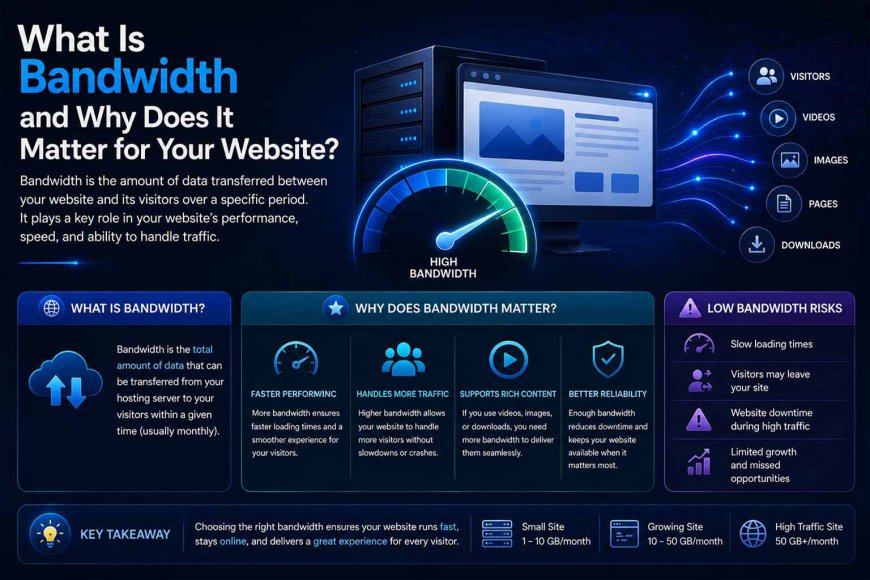
Many website owners still focus on factors such as storage space, RAM, and processor power when choosing a hosting plan, while paying less attention to bandwidth. However, bandwidth is one of the most important factors affecting a website’s performance, stability, and ability to handle traffic.
As a result, many websites experience slow response times or even temporary downtime during peak traffic periods, despite having powerful hosting resources. In many cases, this happens because website owners do not fully understand the role bandwidth plays in transferring data between the server and website visitors, or its direct impact on website speed and stability.
In this guide, we’ll explain what website bandwidth is, how it works in a web hosting environment, how it affects website speed and performance, and how to choose the right bandwidth capacity for your website’s needs. The goal is to achieve the best possible performance without paying for unnecessary resources.
What Is Bandwidth?
Bandwidth is the maximum rate at which data can be transferred between a hosting server and website visitors over a specific period of time. It is typically measured in bits per second (bps) or its multiples, such as megabits per second (Mbps) and gigabits per second (Gbps).
The amount of available bandwidth determines how quickly a website can transfer data, how many visitors it can handle, and how well it can maintain stable performance under load.
In web hosting, bandwidth can be compared to the width of a road or the capacity of a pipeline used to transfer data between the hosting server and your website visitors.
Think of your website as a store. Bandwidth is like the width of the entrance or the main passage leading into the store. If the entrance is wide enough, hundreds of visitors can enter at the same time without significant congestion or delays.
If the entrance is narrow, however, visitors may experience congestion and delays. In extreme cases, the entrance may effectively become unavailable to new visitors if the number of requests exceeds the available capacity.
Technically, bandwidth does not refer to the amount of data you can store on your website. That is the role of storage space or disk space. Instead, bandwidth refers to the amount of data that can be transferred, whether downloaded or uploaded, over a specific period of time. Hosting providers often calculate bandwidth usage on a monthly basis.
For example, if your homepage, including its images and other files, is approximately 1 MB in size and 10,000 people visit your website during a month, with each visitor loading the page once, the total amount of transferred data would be approximately:
1 MB × 10,000 visits = 10,000 MB (approximately 10 GB)
The more visitors your website receives, or the larger its images, videos, and downloadable files are, the more bandwidth you need to keep the website running smoothly and reliably.
Important: Many modern hosting providers advertise “unlimited bandwidth.” However, these plans are often subject to a Fair Use Policy. If your website experiences significant growth or unusually high traffic that consumes excessive server resources and affects other websites hosted on the same server, the hosting provider may require you to upgrade to a higher-tier plan or move to a dedicated server.
How Does Bandwidth Work?
Bandwidth determines how much data can be transferred between your hosting server and website visitors over a specific period of time.
When a user opens a page on your website, their browser sends a request to the server. The server then begins sending the website’s files, such as HTML pages, images, CSS files, and JavaScript files, to the user’s device. This data transfer consumes part of the available bandwidth.
For example, if a webpage contains files totaling 5 MB, loading that page once consumes approximately 5 MB of data transfer. As the number of visitors increases or the size of your website’s content grows, bandwidth consumption increases as well.
Website performance during periods of high traffic depends partly on whether sufficient bandwidth is available. If bandwidth is limited while a large number of requests arrive simultaneously, data transfer can become congested, resulting in slower page loading and delayed server responses.
When sufficient bandwidth is available, the server can handle more simultaneous requests and transfer data more efficiently.
Why Is Bandwidth Important?
Bandwidth is one of the key factors affecting a website’s ability to transfer data and deliver content quickly and reliably. It determines the rate and amount of data that can be exchanged between the hosting server and website visitors over a given period.
When bandwidth is sufficient for a website’s needs, the server can handle more visitors and simultaneous requests without significant slowdowns. However, if the available capacity is insufficient, the website may become slow or difficult to access, especially during periods of increased traffic.
How Is Bandwidth Usage Calculated?
Bandwidth usage is calculated based on the total amount of data transferred between the hosting server and website visitors over a specific period of time.
This includes all files and resources loaded when users visit the website, such as HTML pages, images, CSS files, JavaScript files, and downloadable files.
It is important to note that bandwidth usage does not depend on the total size of all files stored on your hosting account. Instead, it depends on the files and resources that are actually requested and transferred to visitors.
For example, files stored on your server do not consume bandwidth simply because they exist there. They consume bandwidth when users access or download them.
In other words, every time a visitor opens a page or downloads a file from your website, data is transferred from the hosting server to the visitor’s device, and that data counts toward bandwidth usage.
A simplified way to estimate bandwidth consumption is:
Bandwidth Usage = Page or File Size × Number of Loads × Number of Visitors
For example, if your homepage is 2 MB in size and 10,000 visitors open it during a month:
2 MB × 10,000 visits = 20,000 MB (approximately 20 GB per month)
Bandwidth consumption increases as the size of the files being loaded increases or as the number of times those files are accessed grows. This is particularly important for websites that contain high-resolution images, videos, or frequently downloaded files.
What Happens If You Exceed Your Bandwidth Limit?
When you exceed the bandwidth limit included in your hosting plan, the action taken depends on the hosting provider’s policies and the type of plan you are using.
Some hosting companies may temporarily suspend your website until the next billing cycle begins, while others may charge additional fees for the amount of data transferred beyond the included limit.
In some cases, the website may not be completely suspended. Instead, the hosting provider may throttle data transfer speeds or restrict access, resulting in significantly slower page loading and a poorer user experience, particularly during periods of high traffic.
How Do You Choose the Right Bandwidth for Your Website?
Choosing the right bandwidth depends on several factors, including the number of website visitors, the size of the pages and files being loaded, and the type of content your website provides.
There is no single bandwidth capacity that is suitable for every website. A simple blog has very different requirements from a website containing high-resolution images, downloadable files, or video content.
When choosing the right bandwidth capacity, consider the following factors:
1. Expected Traffic
The more visitors your website receives, the more data must be transferred from the server to users, which means you may need more bandwidth.
Small websites with limited traffic generally require less bandwidth than websites receiving thousands or millions of visits each month.
To estimate your requirements, first determine the expected number of visitors and the average amount of data loaded during each visit. You can then estimate bandwidth consumption by multiplying the average page size by the expected number of visits.
Estimated Bandwidth Usage = Page File Size × Expected Number of Visits
For example, if the average size of a page loaded during a visit is 3 MB and your website receives 50,000 visits per month:
3 MB × 50,000 visits = 150,000 MB (approximately 150 GB per month)
Based on this estimate, you can choose a hosting plan that provides sufficient bandwidth while leaving some additional capacity for future growth or unexpected traffic spikes.
2. Website Page Size
The size of your website’s pages has a direct impact on bandwidth consumption. The more data that must be transferred when a page loads, the more bandwidth it consumes.
When visitors open a page, all resources associated with that page may be loaded, including images, CSS files, JavaScript files, videos, and other content displayed to the user.
Therefore, you should focus on the average size of the pages and resources actually loaded during a visit rather than the total size of all files stored on your hosting server.
For example, if a webpage and all of its resources total 5 MB and 10,000 visitors load that page during a month:
5 MB × 10,000 visits = 50,000 MB (approximately 50 GB per month)
For this reason, understanding how much data is loaded during each visit is important when estimating bandwidth usage and choosing an appropriate hosting plan.
3. Type of Content
Bandwidth requirements vary depending on the type of content your website provides.
Websites that rely heavily on media-rich content, such as videos, downloadable files, and high-resolution images, generally require more bandwidth because each visit may involve transferring a large amount of data from the hosting server to the user.
For example, websites that provide applications, software, or downloadable files can consume significant amounts of bandwidth because each download transfers the entire file to the user’s device.
If a particular software package is 500 MB and thousands of users download it, bandwidth consumption can become extremely high.
By contrast, websites that primarily provide text-based or informational content generally require less bandwidth because they rely more heavily on text, optimized images, and smaller files. As a result, less data is transferred when users visit their pages compared with websites that provide large files or video content.
Before choosing a bandwidth plan, consider the type of content your website provides, the size of the files being loaded, and how frequently those files are accessed. The nature of your content has a direct impact on how much data your website consumes.
4. Future Scalability
When choosing bandwidth, you should not consider only your website’s current requirements. It is also important to select a capacity that can accommodate future increases in traffic and content without requiring frequent hosting upgrades.
Ideally, choose a plan that leaves room for growth rather than one that is already close to its maximum capacity.
For example, if your website currently uses only 30% of the available bandwidth, having the remaining 70% available gives you room to handle additional visitors and expand your website’s content without negatively affecting performance or requiring constant plan upgrades.
What Consumes Website Bandwidth?
Bandwidth is consumed whenever data is transferred between the hosting server and website visitors, whether data is being downloaded from the server to the user or uploaded from the user to the server.
The amount of data transferred over the network is generally counted toward your monthly usage.
The main elements that consume website bandwidth include:
1. Website Pages and Core Files
Whenever a visitor opens a webpage, the files associated with that page are transferred from the hosting server to the visitor’s browser.
These may include HTML, CSS, and JavaScript files. The size of these files contributes to overall bandwidth consumption.
For example, if the core files loaded when a page opens total 4 MB, that amount of data is transferred each time the page is loaded.
If 1,000 visitors load the page:
4 MB × 1,000 visitors = 4,000 MB (approximately 4 GB)
As the number of visits increases, data transfer consumption increases as well. Therefore, optimizing file sizes and reducing unnecessary data are important for maintaining website performance and minimizing resource usage.
2. Images and Media Files
Images can consume a significant portion of website bandwidth, especially high-resolution images or files with large file sizes, because loading them requires more data to be transferred from the hosting server to the visitor’s browser.
For example, if a single image on your website is 1 MB and 10,000 visitors open a page containing that image, approximately 10 GB of data would be transferred for that image alone.
Bandwidth consumption can become even higher on websites with large numbers of images or high traffic volumes, such as e-commerce websites, news websites, and product catalogs.
3. Videos and Audio Files
Videos and audio files are among the most bandwidth-intensive types of content because they can contain large amounts of data and often require continuous data transfer while being played.
For example, if a video hosted on your website is 500 MB and 1,000 visitors watch or download it, approximately 500 GB of data could be transferred for that file alone.
For this reason, websites that host large amounts of video or audio content directly on their hosting servers can consume significant amounts of bandwidth.
4. Downloadable Files
Downloadable files can consume substantial amounts of bandwidth because each download transfers the complete file from the hosting server to the user’s device.
For example, if your website provides a 1 GB file and 1,000 users download it during a month:
1 GB × 1,000 downloads = 1,000 GB (approximately 1 TB)
Bandwidth consumption can become particularly high on websites that provide applications, software, games, e-books, or other large downloadable files.
5. User Visits and Website Browsing
User traffic is one of the main factors affecting bandwidth consumption because every visit to your website can involve transferring multiple resources from the hosting server to the visitor’s browser.
When a visitor opens a page, its associated resources may be loaded, including text, images, CSS, JavaScript, and other files. The size of this transferred data contributes to bandwidth usage.
For example, if a page requires 3 MB of data to load and 50,000 visitors open that page during a month:
3 MB × 50,000 visits = 150,000 MB (approximately 150 GB per month)
If each visitor views two pages instead of one, the amount of transferred data will increase accordingly.
In general, bandwidth consumption depends on two primary factors:
-
The amount of data transferred
-
The number of times that data is requested by visitors
As either the file size or the number of visits increases, total data consumption increases as well.
How Can You Reduce Bandwidth Consumption?
Now that we have covered the factors that contribute to bandwidth consumption, let’s look at some of the most effective ways to reduce usage, improve website speed, and reduce the load on your hosting server.
1. Optimize Core Website Files
HTML, CSS, and JavaScript files are among the resources loaded when visitors access your website. Reducing their size can help decrease the amount of data transferred.
You can achieve this by compressing files, removing unnecessary code, reducing excessive whitespace and characters, and combining certain files when appropriate.
These techniques reduce the amount of data that needs to be transferred from the server to visitors.
2. Compress and Optimize Images
Images are among the elements that can have the greatest impact on bandwidth consumption. Optimizing them can significantly reduce the amount of data transferred.
This can be done by compressing images before uploading them, resizing images to match their actual display dimensions, and using modern image formats such as WebP, which can provide smaller file sizes while maintaining good visual quality.
The smaller your images are, the less data the server needs to transfer when pages load. This reduces bandwidth consumption and can also improve website loading speed.
3. Optimize Videos and Audio Files
Videos and audio files can consume significant amounts of bandwidth, so they should be handled carefully to reduce the load on your hosting environment.
Avoid storing large amounts of video content directly on your web hosting server whenever possible. Instead, consider using specialized video hosting platforms or external storage services when appropriate.
4. Optimize Downloadable Files
On websites that provide downloadable files, such as software, applications, or e-books, repeated downloads can consume large amounts of bandwidth.
It is therefore recommended to optimize these files and reduce their size whenever possible. Using appropriate storage and content distribution solutions can also help reduce resource consumption and improve website performance.
5. Use Caching
Caching helps reduce the number of requests sent to the hosting server by temporarily storing copies of files and pages.
These cached copies can then be delivered to visitors without requiring the server to generate or transfer all of the data again every time the page is requested.
This can reduce data transfer and bandwidth consumption, particularly for websites with pages that are visited frequently.
6. Use a Content Delivery Network (CDN)
A Content Delivery Network (CDN) distributes website files across a network of servers located in different geographic regions.
This allows visitors to retrieve files from a server that is geographically closer to them rather than relying entirely on the primary hosting server.
As a result, a CDN can reduce the load on the origin server, improve website loading times, and reduce bandwidth consumption from the main hosting server, especially for websites that receive visitors from different parts of the world.
7. Monitor Bandwidth Usage
Monitoring the bandwidth reports provided by your hosting company can help you identify which files or pages are consuming the most bandwidth and determine where optimization is needed.
Regular monitoring can also help you detect unusual spikes in usage, optimize your content, or upgrade your hosting plan when necessary to maintain website stability.
Bandwidth vs. Data Transfer in Web Hosting
Now that we have covered bandwidth, its importance, how it is measured, the factors that affect its consumption, and ways to reduce bandwidth usage, it is important to understand another related concept: data transfer.
Many users confuse bandwidth with data transfer, and some hosting providers use these terms in ways that can be confusing for beginners.
This can lead to misunderstandings about hosting plan specifications and cause users to choose plans that do not match their website’s actual requirements.
Understanding the difference between these two terms is therefore important before purchasing a web hosting plan.
In Simple Terms
Bandwidth: The capacity or rate at which data can be transferred between the hosting server and website visitors at a given moment. It is typically measured in megabits per second (Mbps) or gigabits per second (Gbps).
Data Transfer: The total amount of data transferred between your website and its visitors over a specific period, such as a month. It is typically measured in gigabytes (GB) or terabytes (TB).
Imagine that you operate a very large library with a main entrance through which visitors enter, along with a record that tracks the number of books borrowed and returned over a specific period.
This simple example can help illustrate the practical difference between bandwidth and data transfer.
Bandwidth
Bandwidth represents the capacity of the entrance or the road’s ability to handle traffic at a given moment.
If the library has a narrow entrance that allows only one person to enter at a time while hundreds of people are waiting outside and trying to enter simultaneously, congestion and delays will occur.
If you widen the entrance so that many people can enter at the same time, traffic will move faster and more smoothly.
This is similar to increasing bandwidth in web hosting. More bandwidth means a greater capacity to transfer data simultaneously, allowing a website to handle more concurrent requests without significant slowdowns or performance bottlenecks.
Data Transfer
Data transfer is different. It does not measure the website’s capacity to transfer data at a specific moment. Instead, it measures the total amount of data transferred over a specific period.
Continuing with the library example, imagine that at the end of the month you check the records and discover that visitors borrowed and returned a total of 500 books over 30 days.
That total represents the overall amount of usage. In a website environment, this is similar to data transfer: the total amount of data transferred from the server to visitors during the month, including webpages, images, videos, and downloadable files.
In Summary
Bandwidth: The website’s capacity to transfer data at a given moment — essentially, the available transfer capacity between the hosting server and visitors.
Data Transfer: The total amount of data transferred and consumed over a specific period, such as a day or month.
Therefore, when choosing a web hosting plan, you should not look at the word “Bandwidth” alone. It is also important to understand the plan’s data transfer limits and policies, as both can affect your website’s ability to provide a fast and stable experience for visitors.
Conclusion
In this guide, we explored what website bandwidth is, why it is important for web hosting, how bandwidth usage is calculated, and the factors that affect consumption. We also covered practical ways to reduce bandwidth usage and improve website performance.
Understanding these concepts can help website owners choose the right hosting plan for their needs and avoid performance issues or downtime caused by underestimating bandwidth requirements.
We hope this guide has helped you understand the importance of bandwidth and how to manage it more effectively. Thank you for reading.